Posts

Showing posts with the label video

Troubleshooting: How to fix "Remove Blank Lines for Empty Fields" in InDesign Data Merge

Image
I'm working on a card design that has multiple variables within the same text field. Each variable is its own paragraph with its own Paragraph Style. It's rare that every card has content for each variable ABC though. Usually it's a mix, like AC, AB, or BC. The issue is that when you delete empty lines, sometimes the remaining paragraph gets re-assigned the deleted paragraph's style. Compound this over a whole document and you can see why it's a pain in the butt. Here's a video explaining the situation: Here's my solution: To reliably remove blank lines from a merged document, first do NOT activate "Remove Blank Lines for Empty Fields" in your Content Placement Options. It's often too buggy to be reliable, except in the most simple cases where all of the paragraphs have the same style anyway. Then Create Merged Document as you normally would. The resulting document will have a lot of blank lines because of the empty fields. Here's what you ...

Making a Better Drop Shadow

Image
  New video! Here's a simple trick I've used for years to make a better drop shadow than the default shadow you get from layer effects. Hope you find it useful!

Board game spaces on paths in Adobe InDesign [Bargain Basement Bathysphere]

Image
Sometimes when you're designing a game board, you want to use a meandering path of spaces like an old Snakes & Ladders game. A simple grid simply won't satisfy all the branches, twists, and turns the game requires. That's the challenge presented when we had to lay out the new maps for  Bargain Basement Bathysphere . This layout uses a very clever solution that I'd like to share with you today! The Design Challenge In the image above, you can see how a final map has a serpentine layout, filled with several types of spaces at irregular intervals. We needed a layout solution that would do the following: Allow us to adjust paths of an entire sequence of spaces without having to manually move and rotate every single object. Keep a literal line connecting the spaces to one another, but it must be in the background and ideally not require a lot of manual editing either, since there will be many paths. Use linked images for the spaces rather than making raw vector shapes. T...

Watch: Laying out a rulebook from scratch

Image
  Here's a full design session where I lay out a rulebook from scratch. I start with the original text doc provided by the client and go over my step-by-step process of breaking it down, then building it back up into a first draft rulebook. It's a long one, so if you have any questions along the way feel free to ask! [Originally published April 30, 2017]

Interview: Revising the Yokohama rulebook with Seth Jaffee

Image
  Here's an extra bit of my interview with Seth Jaffee about revising Yokohama for Tasty Minstrel Games. This time we focus pretty much on the rulebook on its own, from the writing to little details in the diagrams. It's good stuff. Many thanks to Seth for lending his time for this call and to Adam McIver for letting me use high-res images of the rulebook for the slideshow at the end. [Originally published March 31, 2017]

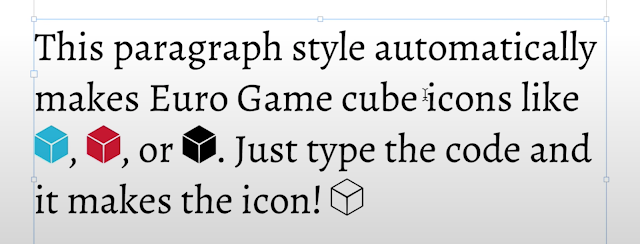
"Euro Cube" Icon InDesign Template Paragraph Style

Image
Here's a little InDesign goodie for you this week. It's a complete paragraph style with GREP strings that automatically turns text into colored euro-style cube icons.  Red cube is [R] Orange cube is [O] Yellow cube is [Y] Green cube is [G] Blue cube is [B] Indigo cube is [I] Violet cube is [V] Black cube is [K] White cube is [W] Just type the code and the icon magically appears! Here's a video tutorial showing it in action. Download "Eurocube" paragraph style and font kit [Originally published February 22, 2017]

Tips for Art Direction: Character Design

Image
Let's go into more detail about a very common art direction task: A single character on a transparent background. You'll be doing this kind of art order a LOT in this business, so I thought it was worth exploring. Hopefully you still dig this topic! [Originally published February 15, 2017]

What does an art director do?

Image
  This video introduces the basics of the art director job. What does an art director do exactly? What can you learn from the job when you have to hire and direct an artist?  Take a look and see! [Originally published January 20, 2017]

Download: Sci-Fi/Fantasy Card Game Kit

Image
Here's a card design template inspired by the sci-fantasy aesthetic of digital CCGs that was popular a few years ago. You get layered TIFs of each card design with five different colors so you can toggle the name bar, sidebar, and text window. You also get the original PSD complete with every original layer and the original vector INDD wireframe design. Download "Star Duel" Card Design Template [Originally published on Patreon October 26, 2016]

How to design score tracks

Image
  This episode of card at work is all about scoring tracks! Those humble devices that keep track of your current score during the game. Now, you'll get some opinions out there about one type of scoring tracker being objectively better than another, but I tend to take a more subjective view. This video outlines four different methods of keeping score, their strengths and weaknesses, and how to best handle their graphic design. This video closes with a handful of best practices applicable to any style of scoring track. Thanks so much for your support! If you have any comments or questions, please leave them down below. If you have other topics you'd like me to discuss, feel free to make a request! Thanks so much! [Originally published on December 15, 2016]

How to automatically "Capsule" key words in game text

Image
  This episode continues the previous lesson  in setting up custom tags for highlighting key words in card text. In this lesson, we learn how to make "capsule" style highlights that flow with your text. No need for anchored graphics with this method! This episode concludes with a peek at I CAN'T EVEN WITH THESE MONSTERS, the first in my I CAN'T EVEN card game series. The card text in this game uses more advanced highlight tags which include special "escape" slashes in the GREP expression. The result is a tagging system that pretty much looks just like HTML, which makes it easier for your team to style their raw text. If you found this useful or have some additional techniques related to this, please share in the comments! [Originally published on Patreon: September 15, 2016]

Highlights from BGG.con! [Video]

Image
Thanks for being patient with my slow posting schedule the past few weeks. I'd been preparing non-stop for BGGcon this year (and then catching up on all the other freelance work that backed up before then). I wanted to come to this con more prepared with prototypes that might be a better fit for the current market. Seemed to work out! It was certainly my most hectic and busy con in many years. Seemed like I was always bustling from one impromptu meeting to another the whole time. I arrived with about 7 prototypes and they're all now in someone else's hands. That's no guarantee of publishing, but at least it's a nice start! Always a good sign of a healthy business trip. The rest of my time was spent trying out fun new games and some old favorites with new friends. Check out the video above for a highlight reel of some of the games that hit the table.

▶️ Highlight Key Words with Custom Tags in InDesign [Card at Work: 15]

Image
Laying out a card game but your team members don't have indesign? Spreadsheets don't keep character formatting either, so that's no help. How can your team call out key words for you to style? Custom tags! Using a library of customized plain text tags makes it easy to know which words need to be styled a particular way. By setting up a few simple GREP styles in InDesign, those tags will automatically highlight and style those key words like magic. All you have to do is merge the records in DataMerge as usual and InDesign does the rest of the work for you. Hope you find this useful! Support more videos at patreon.com/danielsolis !

Card at Work: 11 - Inserting Optional Line Breaks with DataMerge

Image
It's a new episode of Card at Work , the video series covering the basics of designing cards for tabletop games! This time we're building on the GREP tricks from the last episode on inline icons and using similar technique to insert optional line breaks within a single cell of a spreadsheet. Using this method, you can drop a line break into a single block of text without needing a manual line break in the InDesign template itself OR using a find-replace after merging the document. This is my first Card at Work episode in HD resolution. I'm slowly figuring out Adobe Premiere so hopefully these episodes will be even higher quality as time goes on. P.S. I'll be streaming today live at around noon EST. I'll be working on a new round of layout updates for Chimera Station from Tasty Minstrel Games at http://www.twitch.tv/danielsolis81 . Support more videos at my Patreon!

Logo Design Time Lapse Video – Catty B's

Image
Here's a new time-lapse video of a recent logo design for Catty B's , a comedy series from Angela Webber and Lucia Fasano. They were very kind and generous to let me record and share this design process. Patrons $10+ also get a version of this video with commentary about how I designed this logo and some of the decision process. Hope you all find that useful! Thanks to Angela, Lucia, and all my patrons for making these videos possible!

DSGN PNCH - A short series of short graphic design videos

Image
I'm trying out something a little different for this series. I want to break down the big giant scary subject of graphic design into the tiniest possible pinches so they're a little less intimidating. I don't know how long this series will last, I only have a few topics lined up so far: Which colors are best to avoid color-blindness issues? How do I lay out light text on a dark background? What's a good font size? If you have any other topics you want me to discuss in a

đŸ“č Watch: How to play Kodama: the Tree Spirits

Image
I'm so honored to see Rodney Smith teach how to play Kodama: the Tree Spirits . He really sets the standard for all other video tutorials for clarity, brevity, and thoroughness. Check out the video embedded above to see Rodney teach the game far better than I could. :D

Watch Action Phase Games demo Kodama: the Tree Spirits at GAMA [Starts 1:56:55]

Action Phase is at GAMA this year promoting their line of really cool games, including my own Kodama: the Tree Spirits ! Check out the recorded Livestream at the link above or click here . Starting at 1:56:55, you can watch Nick Little and Eric Martin from BoardGameGeek talk about the history of the game's development and design. It's really cool! You can pre-order the base game from Action Phase directly here or the deluxe edition here . As an added bonus, you can see them enthusiastically discussing Trickster right after that demo!

Resizing a Hardcover Design [Patreon Sample]

Image
Hello All! Aside from my Card at Work videos available for the general public, I've been recording more of my real-world process as I work through various design problems with actual projects.  This time the session was short enough and the project simple enough that I thought it would be a good example of a typical recording: In this session , I had to resize the cover of Do: Fate of the Flying Temple to new hardcover specs. However, the current dimensions were waaay different than the new dimensions provided by the printer. This video covers a few different photoshop techniques to make the resize as seamless as possible without losing any resolution. - Layer Effects - Gradient Layer Masks - Layer Groups with Layer Effects That's just this session. The other videos go into more detail about advanced InDesign techniques for even more real-world projects.  The entire archive of real-time sessions are available to all $10+ patrons. I hope you find them useful! Please share fr...

Carcassonne Live! Chris Bryan vs. Me, 2/26 3pm EST

Image
I challenge Board with Life 's Chris Bryan to a duel on the fields of Carcassonne! Meeple a Meeple. Join us at my twitch channel on Friday 2/26 3pm EST and watch my glorious yet magnanimous victory or my humbling and petulant defeat! Either way, it'll be fun times on a Friday afternoon. See you there!